Soundop
Intuitive and Professional Audio Editor for Windows
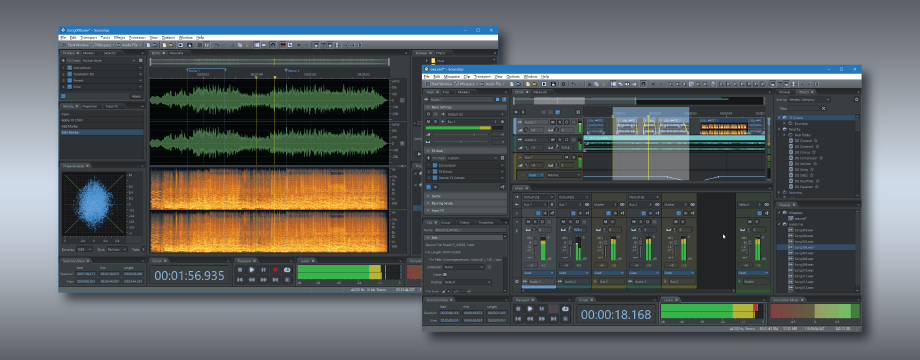
Soundop is a professional audio workstation for Windows, designed for podcasters, musicians, audio engineers, sound designers, voice-over artists, and other audio professionals. It provides an intuitive and flexible environment for recording, editing, mixing, mastering, and audio processing, while remaining remarkably compact and fast to launch.
The Audio File Editor supports both waveform and spectral editing, while the Multitrack Editor enables mixing with unlimited audio and bus tracks. Its powerful audio engine supports flexible routing, sends, side-chain processing, and automatic latency compensation. Both tracks and clips feature FX racks with comprehensive automation for effect parameters.
Soundop includes a suite of carefully designed built-in effects and supports VST and VST3 plug-ins. Parallel and mid-side effect groups provide flexible ways to build complex effect chains, while ARA support enables advanced audio processing and editing workflows.
The audio engine supports ASIO, WASAPI, MME, and DirectSound drivers, with recording at up to 24-bit / 192 kHz. Soundop can import audio from a wide range of popular audio and video formats and export to major audio formats, with support for metadata including ID3 tags, RIFF chunks, Vorbis comments, and ACID loops.
The CD Track Editor supports audio CD burning with customizable track gaps and post-burn verification. Processors provide reusable sequences of audio editing operations, from copying and pasting to applying effects and processing selected channels or time ranges. The Batch Processor can apply processors to multiple audio files, save results in target formats, and run multiple batch-processing tasks concurrently.
Despite its comprehensive feature set, Soundop has a remarkably small installation footprint and launches quickly, allowing you to start working with audio without waiting for a large application to load. It combines the capabilities of a full-featured professional audio workstation with an efficient, lightweight design.
Key Features
Audio Devices
- Play and record with ASIO, MME, WASAPI, and DirectSound drivers.
- Customize channel mapping for each audio device.
- Record audio up to 24-bit precision and 192 kHz.
- Capture system audio using WASAPI loopback.
Audio Formats
- Import audio files from all major audio formats.
- Export audio files in widely used formats, including MP2, MP3, AAC, WAV, AIFF, OGG, FLAC, APE, and WMA.
CD Support
- Import audio data from CD tracks.
- Burn audio CDs with customizable track gaps in Disc-at-Once (DAO) mode.
- Erase CD-RW media prior to reuse.
- Verify the integrity of audio CDs after burning.
Video Support
- Import audio and video files from a wide range of video formats.
- Export videos in MP4, WMV, and MOV formats.
- Attach videos within both the audio file editor and the multitrack editor.
- Synchronize video within the timeline when editing audio.
Creating Loops
- Edit ACID metadata to create ACID loops.
- Adjust marker positions for sampler loops.
- Apply crossfades to the ends of sampler loops.
- Automatically detect the optimal position for sampler loops.
Editing Metadata
- Edit metadata in ID3 tags, Vorbis comments, RIFF, AIFF, and other supported formats.
- Edit cover art for MP3 and FLAC files.
- Edit cue markers.
- Display the metadata supported for specific audio formats in the Metadata panel.
Recording Audio File
- Record audio using insert mode and overwrite mode.
- Enable pre-roll playback prior to recording.
- Schedule recordings for a future time using the timed record feature.
- Automatically skip silence during recording using level-activated recording.
Audio File Editing
- Edit audio with sample-level precision.
- Apply editing operations exclusively to the active channel and selected frequency range.
- Play audio limited to the selected frequency range.
- Adjust time selections to align with the zero crossings of the waveform.
- Automatically remove artifacts at editing boundaries using crossfades.
- Compare audio by synchronizing views and selections across multiple audio files.
- Collaborate seamlessly with external editors while preserving editing history integrity.
- Repeat the last processing operation using identical settings.
- Perform a sequence of editing and processing operations on a predefined time and frequency range using processors.
- Append multiple audio files to create a single file.
- Extract individual channels to separate mono files.
Processing Audio
- Edit audio using standard copy, cut, paste, delete, and crop operations.
- Mix or insert audio from the clipboard or a file, and loop segments multiple times.
- Amplify audio or adjust fade curves and gain envelopes.
- Normalize amplitude and remove DC offset.
- Apply a sequence of effects to selected audio using the FX rack.
- Apply a single effect directly to selected audio.
- Adjust the tempo and pitch of selected audio.
- Invert or reverse audio.
- Synthesize speech from text.
- Generate tonal audio at a specified frequency.
- Generate colored noise signals.
- Modify the sample rate and channel mode of audio files.
- Automatically detect and remove silence.
Repairing Audio
- Capture a noise profile and remove noise using the captured profile.
- Remove noise adaptively.
- Repair audio clicks using the interpolation tool.
- Identify noise in the spectrogram and remove it using spectral editing.
Analyzing Audio
- Monitor peak levels using customizable meter ranges.
- Monitor true peak levels in the Loudness panel.
- Monitor loudness in accordance with the ITU BS.1770-2 standard.
- Monitor the correlation between audio channels.
- Analyze audio using frequency analysis, phase analysis, and amplitude statistics.
Recording Audio Clips
- Record audio from multiple input devices simultaneously.
- Perform punch-in recording within a specified time range.
- Perform real-time punch-in recording during playback.
- Loop record multiple takes within a single audio clip.
Mixing Tracks
- Support mixing an unlimited number of audio and bus tracks.
- Route the output of a single track to multiple destination tracks.
- Route track output to the side-chain input of audio effects.
- Switch the channel mode of a track.
- Create alternate clip sequences using clip lanes.
- Solo and mute tracks with flexible control options.
- Configure panning modes for individual tracks and clips.
- Apply audio effects to tracks and clips.
- Edit clip sources non-destructively using the ARA extensions.
- Automate track and clip effects using read, write, latch, and touch automation modes.
- Freeze track and clip effects to optimize CPU resource usage.
- Export mixdown of all tracks, a selected time range, individual tracks, or specific clips.
Editing Tracks and Clips
- Add multiple tracks with the same effect sequence, input, and output.
- Set the colors of tracks and clips.
- Set the fade-in and fade-out lengths and curves for a clip.
- Automatically crossfade overlapping audio clips.
- Set a clip as transparent to allow clips beneath to play.
- Amplify a clip or adjust its gain envelope.
- Adjust the tempo and pitch of a clip in real time.
- Align clips in multiple ways.
- Lock clips in time to prevent unintended movement.
- Add multiple clips to a group and select the entire group at once.
- Bounce a track, selected clips, or a specified time range to a new track.
- Merge clips from the same track into a new clip.
- Create a smooth automation envelope with a spline curve.
- Edit the parameter value of an envelope point with precision.
- Synchronize the view and selection range with the audio file editor.
- Snap precisely to markers within an audio file.
- Save the mixing project as a template and create a project from a template.
- Save the mixing project as a new file.
- Save the project and associated media files to a new folder.
Batch Processing
- Set the processor to process the audio files flexibly.
- Set the format of target audio files.
- Set the target filename flexibly with preset.
- Run multiple instances of the batch processor concurrently.
Audio Effects
- Process audio with high-quality built-in effects, including EQ, compressor, limiter, reverb, chorus, flanger, phaser, delay, echo, and others.
- Organize multiple effects as a single effect using FX Group, Mid-Side Splitter, or Parallel Group.
- Process audio using VST and VST3 effect plug-ins.
- Automatically compensate for effect latency.
- Organize effects by vendor, category, location, and VST folder.
- Add effects from the Effects panel using drag-and-drop.
- Import and export effect presets, and use standard formats for VST and VST3 effects.
- Set the default state for newly added effects.
- Add effects to favorites folders.
- Locate effects efficiently by applying filters in the Effects panel.
User Interface
- Work within a dedicated workspace for each project type.
- Work with projects in single or multiple windows.
- Save workspace configurations as presets in both the audio file editor and multitrack editor, and switch between them using keyboard shortcuts.
- Customize keyboard shortcuts specific to each project type.
- Utilize the Start panel to begin work efficiently.
- Undo or redo operations to a specific editing state with a single click in the History panel.
- Use the Browser panel to browse audio files and create shortcuts to favorite locations.
- Manage projects using the Projects panel.
- Customize the appearance of the user interface by selecting waveform color, font color, contrast, and dark theme options.
Please check the Version History of Soundop for recent changes.


